If your laptop’s power cord has gone stiff, frayed, or — worse — actually burnt near the plug, don’t ignore it. A damaged power cord isn’t just an inconvenience; it’s a genuine fire and shock risk. The good news is that most laptops (HP, Dell, Lenovo, Asus, Acer, and more) use the same universal 3-pin “cloverleaf” connector, so a reliable replacement is cheap and easy to find. This guide covers how to spot a damaged cord early, what to check before you buy a replacement, and a tested budget pick under ₹200.
Quick answer: for most laptop power bricks, a universal 3-pin (C5/cloverleaf) power cord priced ₹100-200 with a soft, flexible cable and visible safety certification is the safe choice — avoid unbranded ultra-cheap cords with no certification marks.
Note: This cord recommendation video has been consistently found by people searching “power cord,” “laptop charger price,” “best laptop charger,” and “laptop charger 3 pin plug repair” since 2021 — a sign this is a recurring, ongoing need, not a one-time problem.
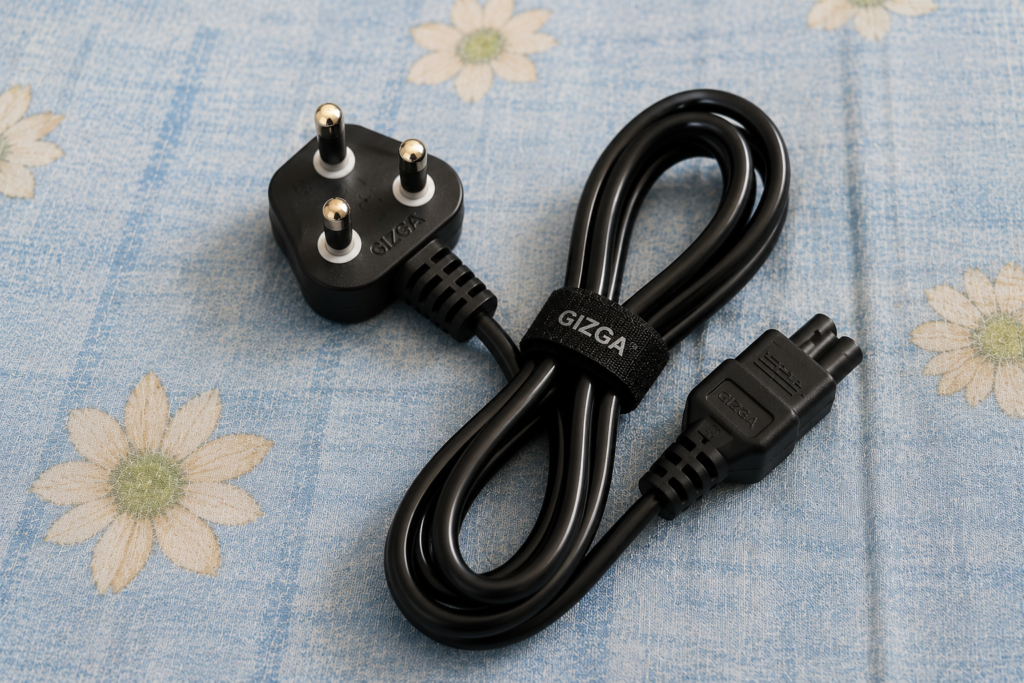
Video Stats: “Best Laptop Power Cord Under ₹200 | Universal 3-Pin Cable” | 15.1K views since published | 192 watch hours | Top related searches: ‘power cord’ (214 views), ‘laptop charger price’ (18 views), ‘best laptop charger’ (12 views)
| ✔ Our Tested Pick: Universal 3-Pin Laptop Power Cord — ₹179 (check current price) → [ https://link.amazon/B0hVbaXzR ] |
Why a Damaged Laptop Power Cord Is Worth Replacing Immediately
A power cord that’s cracked, stiff, or discolored near the plug has usually already started to degrade internally, even if it still technically works. Heat damage — like a cord that’s browned or melted slightly near the connector — is a sign the wiring inside has been under stress, and it can get worse quickly. Replacing a cord costs a fraction of what a damaged laptop charging port or a house fire would cost, so this isn’t a place to wait and see.
Do All Laptops Use the Same Power Cord?
For the most part, yes. The cord that runs from the wall socket to your laptop’s power brick (adapter) is almost always a standard 3-pin “cloverleaf” or “Mickey Mouse” connector (technically called a C5 connector) — the same one used on many desktop monitors and some printers too. This is different from the cord that runs from the brick to your laptop itself, which does vary by brand. In other words:
- Wall-to-adapter cord (what this guide covers): universal 3-pin C5 connector, works across HP, Dell, Lenovo, Asus, Acer, Toshiba, and most other brands.
- Adapter-to-laptop cord: brand and model-specific, not interchangeable between manufacturers.
What to Check Before You Buy a Replacement
Not all cheap power cords are safe. Here’s what separates a genuinely reliable replacement from a risky one:
| What to Check | Good Sign | Red Flag |
| Cable feel | Soft, flexible, doesn’t crack when bent | Stiff, hard plastic-like coating |
| Pin type | 3-pin “cloverleaf”/Mickey Mouse (C5) connector | Wrong connector shape for your adapter |
| Certification | BIS mark or listed safety certification | No certification marks anywhere |
| Seller info | Warranty mentioned in the listing | No warranty, no return policy |
| Price | ₹100-200 range for a basic replacement | Suspiciously cheap (under ₹50) with no brand info |
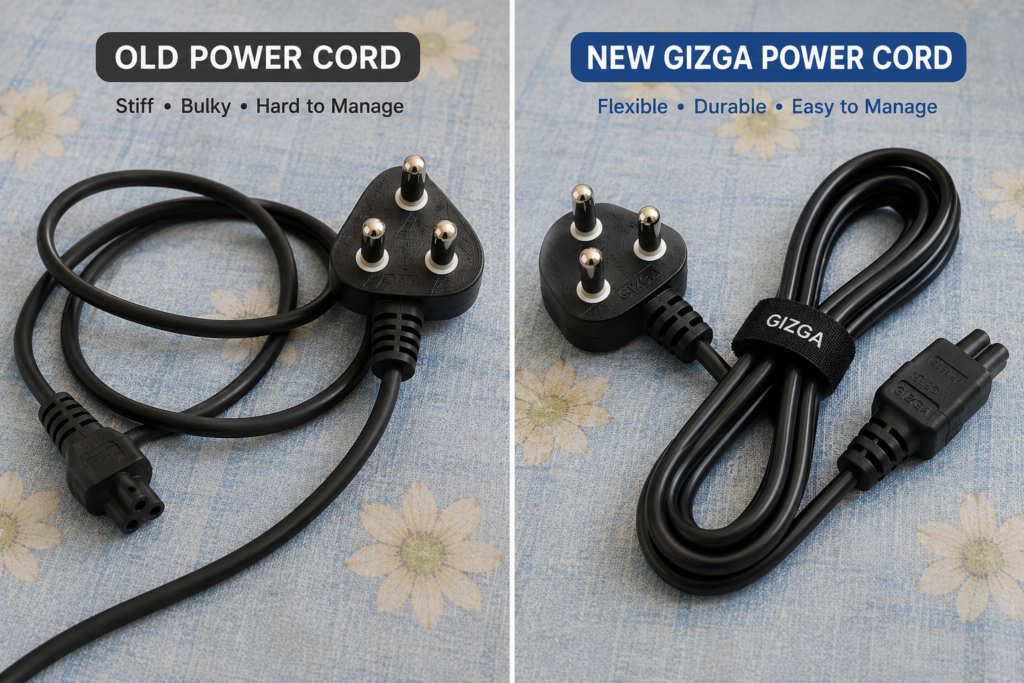
Our Tested Pick: Universal 3-Pin Laptop Power Cord
We tested this cord directly on an HP laptop adapter after our own original cord burned near the connector. Here’s what stood out:
- Priced around ₹179 (sometimes lower during sales, often under ₹120 without delivery charges) — well within the typical ₹100-200 range for a genuine replacement.
- Noticeably more flexible than many stock cords, which tend to be stiffer and more prone to cracking over time.
- Fits directly into standard HP, Dell, and similar power adapters without any modification.
- Listing included a warranty — a good sign, since many ultra-budget cords offer no coverage at all.
| ✔ Check current price and availability → [ https://link.amazon/B0hVbaXzR ] |
Prices on marketplaces change often, so always check the current price via the link above rather than relying on a fixed number — the ₹100-200 range has stayed fairly stable for basic universal cords over the past few years, but exact listings and sale pricing shift.
Warning Signs Your Power Cord Needs Replacing
- Discoloration, browning, or melting near either end of the cord
- The cable feels stiff, cracked, or brittle when bent
- You smell something burning near the charger while it’s plugged in
- The connection is loose and needs wiggling to charge
- Visible exposed wiring anywhere along the cable
Safety note: if you see any of the signs above, unplug the cord immediately and stop using it. Don’t attempt to tape over or manually repair a frayed power cord — replacing it is inexpensive and far safer than continuing to use a damaged one.
Pro Tips for a Longer-Lasting Power Cord
- Avoid wrapping the cord tightly around the adapter brick for storage — this is one of the most common causes of internal wire damage over time.
- Unplug by holding the plug itself, not by pulling on the cable.
- Keep the cord away from heat sources and sharp edges, including under a laptop that runs hot.
- If you travel often, consider keeping a spare universal cord in your bag — they’re inexpensive and small enough to carry easily.
FAQs — Frequently Asked Questions
Q1. What is a laptop power cord and how is it different from the charger?
The power cord is the cable that runs from the wall socket into your laptop’s power adapter (brick). The “charger” usually refers to the whole unit — the brick plus both cables. Only the wall-to-brick cord is universal; the brick-to-laptop cord is brand-specific.
Q2. How much does a replacement laptop power cord cost?
A basic universal 3-pin replacement typically costs between ₹100 and ₹200. Prices below that range are usually unbranded cords without safety certification, so treat very cheap listings with caution.
Q3. Can I repair a laptop charger’s 3-pin plug instead of replacing it?
We’d recommend against DIY repairs on a frayed or damaged power cord — it carries mains voltage, and improper repairs are a real safety risk. A replacement cord costs very little compared to the risk, so replacing is the safer choice.
Q4. Will a universal power cord work with my HP, Dell, or Lenovo laptop?
Yes, in almost all cases. The wall-to-adapter cord uses the same standard 3-pin (C5/cloverleaf) connector across nearly every major laptop brand — it’s the brick itself, and the cord from the brick to the laptop, that differ by brand.
Q5. My laptop shows charging but the battery percentage isn’t increasing — is that a power cord issue?
That’s usually a different problem — often related to battery health, power settings, or a failing battery rather than the cord itself. If your cord and adapter both test fine on another device, the issue is more likely with the battery or charging circuit, which a technician can diagnose properly.
Q6. What does “adapter” actually mean for a laptop?
The adapter (also called the power brick) is the box in the middle of the charging cable that converts wall electricity into the lower voltage your laptop’s battery needs. It sits between the wall power cord and the cable that plugs into your laptop.
Q7. Is it safe to buy a laptop power cord online, or should I buy it locally?
Both can be safe as long as you check for a visible safety certification (like a BIS mark in India), a listed warranty, and reasonable pricing. Avoid the cheapest unbranded listings with no certification information, regardless of where you buy.
Q8. How long should a laptop power cord last?
With normal use and reasonable care (not yanking the cord, not wrapping it tightly around the brick), a good quality cord typically lasts several years. Frequent bending at the same spot, heat exposure, and tight wrapping are what shorten its lifespan fastest.
Q9. What’s the difference between a power cord and a power cable?
They’re generally used interchangeably for this purpose — both refer to the same wall-to-adapter cable. Some sellers list the exact same product under either name, so search both terms if you’re comparison shopping.
Q10. Can I use a laptop power cord for other devices too?
Yes — the standard 3-pin C5/cloverleaf cord is also commonly used for desktop monitors and some printers, so a spare one is genuinely useful to keep around beyond just your laptop.
Final Thoughts — Don’t Wait Until a Damaged Cord Becomes a Real Hazard
A stiff, cracked, or burnt power cord is one of the cheapest and easiest fixes in your entire laptop setup — and one of the most important to not ignore. Stick to the checklist above (flexible cable, correct connector, visible certification, listed warranty, reasonable pricing), and a ₹100-200 universal replacement will serve you reliably for years.
| ✔ Ready to replace yours? Check current price → [ https://link.amazon/B0hVbaXzR ] |
If you found this guide helpful, subscribe to the TapsVision YouTube channel and hit the bell icon — we post practical tech buying guides and troubleshooting content regularly, in both Hindi and Hinglish, just for you!
Subscribe TapsVision on YouTube for daily Hindi tech tips — Android, Windows, laptop accessories, and more!
Have a question? Comment below or message us on the YouTube video. Everyone is welcome in the TapsVision community!
— TapsVision