Most people assume the internet runs on satellites floating above us. It doesn’t. The internet is really just millions of computers connected to each other through cables — most of them running along the ocean floor. This guide breaks down how internet works in hindi-speaking simple terms: where the internet actually came from, how your message reaches someone on the other side of the world in milliseconds, and who — if anyone — actually owns it.
Quick answer: the internet is a global network of connected computers linked mainly through undersea fiber optic cables, not satellites. No single company or country owns it — it’s built and maintained by a layered chain of Tier 1, Tier 2, and Tier 3 companies that each sell access to the next.
A Quick History: Where the Internet Came From
Crediting a single “inventor” of the internet is genuinely difficult, since many people contributed to it over time. The first working prototype was built in the 1960s under ARPANET, a project started by the U.S. Department of Defense — ARPA stands for Advanced Research Projects Agency, and the network was originally built for the U.S. military. As the technology developed, two scientists — Robert Kahn and Vint Cerf — made a defining contribution by creating the TCP protocol, which made it possible for the internet to reach people far more easily and reliably.
So, How Does the Internet Actually Work?
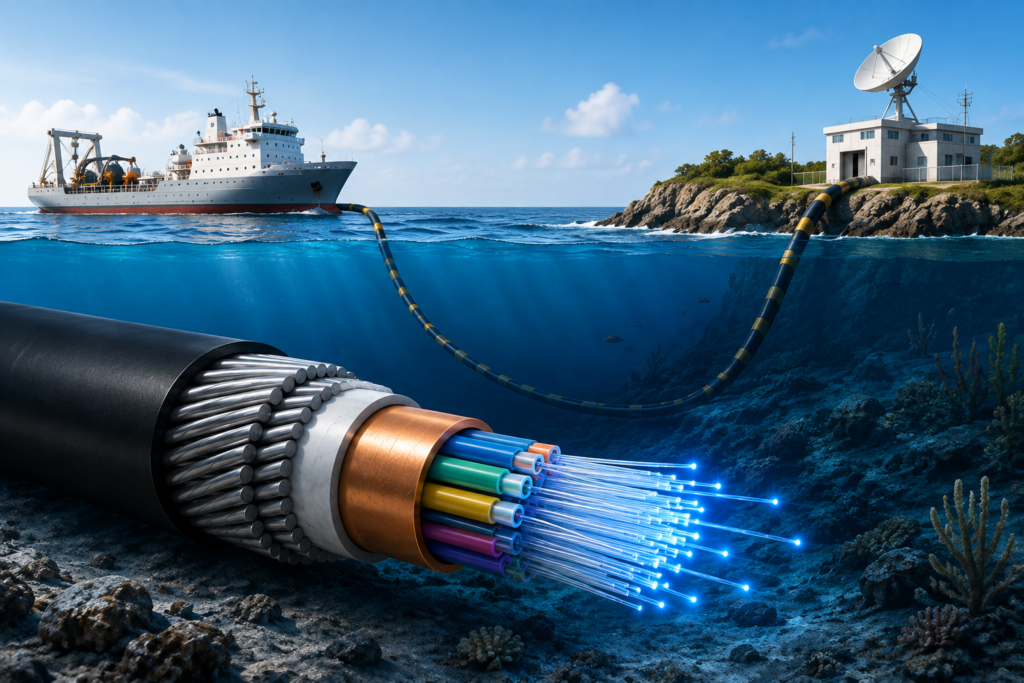
In simple terms: the internet is a network of millions of connected computers. Every instant message, fast email, and lightning-quick search result is only possible because these computers are physically linked together by cable — specifically, advanced cables called fiber optic cables.
Myth: The Internet Runs on Satellites
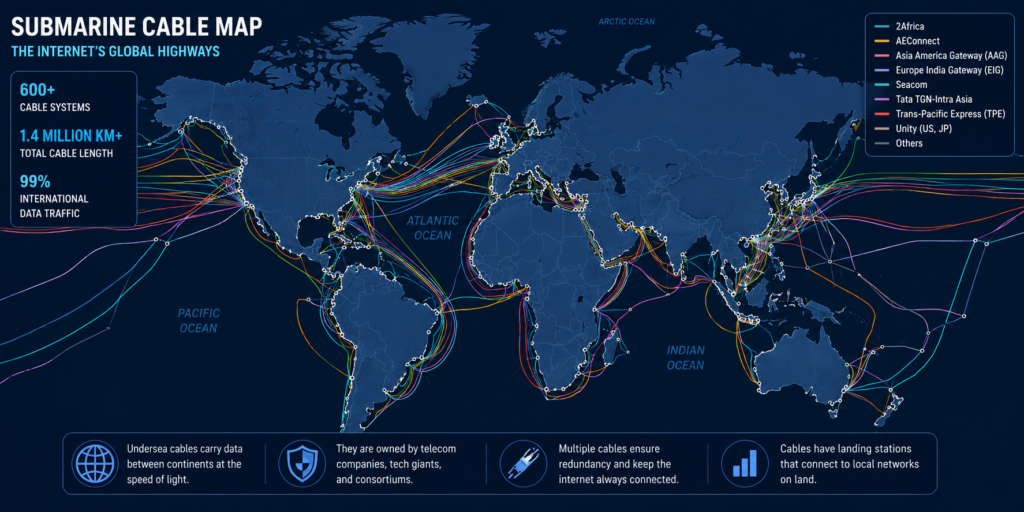
Most people assume satellites are doing the heavy lifting, but that’s not accurate. The majority of global internet traffic travels through fiber optic cables laid across the ocean floor, spanning millions of kilometers and connecting country to country directly. Here’s a fact worth knowing: the internet itself is technically free. What you actually pay your provider for is the maintenance of these cables and the infrastructure built around them.
- Fiber optic cables typically last 25-30 years, though damage can happen sooner.
- Common causes of damage include ship anchors, natural wear, or even marine life (like fish) making contact with the cable.
- Because of this, backup cables are laid alongside the primary ones under the ocean.
- Modern fiber optic cables can carry speeds up in the range of 200 Gbps, giving them the massive bandwidth needed for near-instant results when you search or send a message.
Who Owns the Internet? The Three-Tier Company Structure
There’s no single owner. Instead, three layers of companies work together to get internet access to your home:
| ISP Tier | What They Do | Example |
| Tier 1 | Lay and own the undersea fiber optic cables connecting countries directly | Tata Communications (India) |
| Tier 2 | Buy bulk data/bandwidth from Tier 1 companies and resell it as broadband | Jio, Airtel, BSNL |
| Tier 3 | Buy from Tier 2 companies and provide local, area-specific internet access | Local ISPs like Tikona, Hathway |
So when you pay for a WiFi or mobile data plan, you’re really paying a Tier 3 (or sometimes Tier 2) company, which has itself paid the tier above it, all the way back to the Tier 1 companies that physically laid the undersea cables in the first place.
How the Internet Reaches Your Home or Phone
Connecting millions of computers directly to each other with individual cables would be impossibly complex — even connecting just 10 computers directly to one another requires dozens of separate cables. The solution is the router: a small, computer-like device that manages these connections. Your home WiFi router is a perfect example — it’s what lets your Android TV, laptop, and phone all connect to the internet at once. On a much larger scale, all these routers around the world are themselves connected to each other, forming the massive network we call the internet.
Here’s how the connection chain typically works for home internet:
- Your Internet Service Provider (ISP) has a large modem at their end that purchases bandwidth/plans from a Tier 2 company.
- A smaller modem is installed at your building or home, connected via cable back to the ISP’s infrastructure.
- That modem connects to your router, which is what actually provides WiFi access to your devices.
- Once your plan expires, this connection is cut off until you recharge or renew it.
Domain Names vs IP Addresses — Why “www.google.com” Actually Works
Every website you visit has an address, much like your house has a room or house number. That underlying address is called an IP address — a string of numbers that’s hard for humans to remember. So instead, we use a domain name (like www.google.com or www.youtube.com), which is simply an easier-to-remember label pointing to that same IP address. For example, when you search www.google.com, your request travels through cables all the way to Google’s server (located in California), which recognizes the request and sends the data back to your device.
Packet Switching — How Data Actually Travels
Whether you’re loading Google or YouTube, the data doesn’t arrive as one solid block — it comes in small pieces called packets, encoded in binary (0s and 1s). Each packet is addressed correctly so it reaches your specific device and not someone else’s — this process is called packet switching. Once all the packets arrive, they’re reassembled and processed, which is what you see as a finished search result or loaded page on your phone or laptop.
Related Terms Worth Knowing
A few related concepts that build on what’s covered here — worth exploring in a dedicated follow-up if you want to go deeper:
- TCP Protocol — governs how data is broken into packets and reassembled reliably.
- IP Protocol — handles addressing, making sure packets reach the correct device.
- Internet Protocol (IP) addresses — the numeric “room number” behind every domain name.
FAQs — Frequently Asked Questions
Q1. How does the internet actually work?
The internet is a global network of connected computers, linked mainly through undersea fiber optic cables. When you search or send a message, your request travels through these cables as small data packets to a server, which processes it and sends the result back the same way.
Q2. Does the internet run on satellites?
No, this is a common misconception. The vast majority of global internet traffic travels through undersea fiber optic cables, not satellites. Satellite internet exists (like Starlink) but represents a small fraction of overall global traffic.
Q3. Who owns the internet?
No single person, company, or country owns the internet. It operates through a layered structure of Tier 1 companies (who lay the physical undersea cables), Tier 2 companies (who buy bandwidth and provide broadband), and Tier 3 companies (local ISPs who sell access to end users).
Q4. Who invented the internet?
No single inventor — it was a collective effort. The first working prototype was ARPANET, developed in the 1960s for the U.S. Department of Defense. Robert Kahn and Vint Cerf later made a defining contribution by creating the TCP protocol.
Q5. Is the internet actually free?
Technically, yes — the data transmission itself doesn’t have an inherent cost. What you pay your ISP for is the maintenance of the physical cable infrastructure and the business of delivering that access to you reliably.
Q6. What is the difference between a domain name and an IP address?
An IP address is the actual numeric address of a website’s server — hard for humans to remember. A domain name (like google.com) is a human-friendly label that points to that same IP address behind the scenes.
Q7. What is packet switching?
It’s the method by which internet data travels — instead of sending information as one large block, it’s broken into small pieces called packets, sent independently, and reassembled correctly at the destination device.
Q8. How long do undersea internet cables last?
Typically 25-30 years, though they can be damaged sooner by ship anchors, natural wear, or marine life. Backup cables are laid alongside primary routes specifically to handle these disruptions without major service interruption.
Final Thoughts — The Internet Is Simpler Than It Seems
Strip away the jargon, and the internet is really just millions of computers talking to each other through cables — most of them running along the ocean floor, not through satellites overhead. No single company owns it; instead, a layered chain of Tier 1, Tier 2, and Tier 3 providers work together to get a connection to your home or phone. Once you understand that basic structure, everything else — routers, IP addresses, packet switching — builds naturally on top of it.
If you found this guide helpful, subscribe to the TapsVision YouTube channel and hit the bell icon — we post clear, well-researched tech explainers regularly, in both Hindi and Hinglish, just for you!
Subscribe TapsVision on YouTube for daily Hindi tech tips — networking basics, Android, Windows, and more!
Have a question? Comment below or message us on the YouTube video. Everyone is welcome in the TapsVision community!
— TapsVision